Back to Home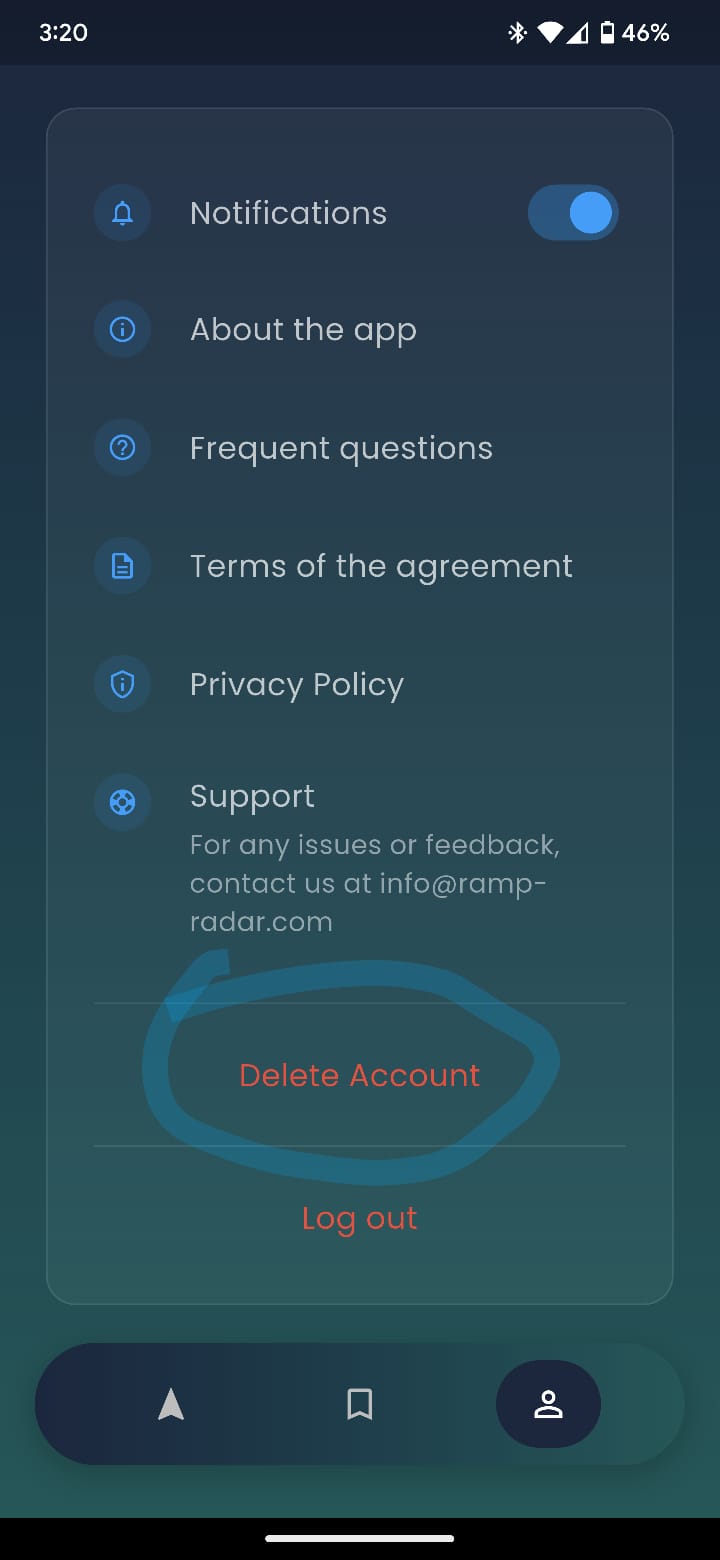
How to Delete Your Account
Follow these simple steps to permanently delete your Ramp Radar account and associated data.
Deletion Steps
1
Open the Ramp Radar App
Launch the Ramp Radar mobile application on your device.
2
Navigate to Settings
Tap on the Settings tab in the navigation bar. This is the third tab at the bottom of your screen.
3
Scroll to Bottom
Scroll down to the bottom of the Settings screen to find account management options.
4
Tap Delete Account
Locate and tap the "Delete Account" button at the bottom of the Settings screen.
5
Confirm Deletion
Review the warning message and confirm that you want to permanently delete your account and data.
Settings Screen Reference
Important Information
Before you delete your account, please understand the following:
- All your personal data will be permanently deleted, including your profile information, preferences, and account settings. This action cannot be undone.
- Your ramp reviews will remain visible to help the boating community, but they will be marked as anonymous. Your identity will no longer be associated with these reviews.
- Account deletion is immediate and cannot be reversed. You will need to create a new account if you wish to use Ramp Radar again in the future.
- You will no longer receive notifications or updates from Ramp Radar after deletion.
Need Help?
If you don't have access to your account or need assistance with deletion, we're here to help.
Email us at info@ramp-radar.com